Guides/Article
Free Museum/Exhibition Label Generator (No Design Skills Needed)
7 min read · Updated September 16, 2026
You do not need Canva skills or a graphic designer to make a clean museum or exhibition label. A free label generator puts artist, title, year, and medium under your artwork photo in a few steps — ready for Instagram, a PDF, or a wall sheet.
This guide explains what a generated label should include, how to use ArtCaption as a free museum/exhibition label generator, and when to keep the text short vs extended. For field-by-field writing help, see How to Write a Caption for a Painting (Artist, Title, Year, Medium). To place the label on the image without Photoshop, see How to Add a Caption Under an Artwork Photo (Without Photoshop).
What a museum/exhibition label generator should output
A good generator does not invent design trends. It produces a readable tombstone — the same facts a wall label needs — under or beside your image.
- Artist name (optional life dates)
- Title and year
- Medium and dimensions
- Courtesy, collection, or gallery credit when relevant
Why “no design skills” still looks professional
Museums win on consistency, not decoration. Fixed field order, clear hierarchy, and enough contrast beat ornate layouts that fight the artwork.
- One type style, not five fonts
- First line bold for the artist
- Blank lines only where spacing helps
- Export that keeps credit attached to the image file
How to generate a free exhibition label with ArtCaption
ArtCaption works in your browser. Drop a photo, paste your label text, preview, and export — no account required for the core flow, and your artwork stays private on your device.
- 1. Open ArtCaption and add your artwork image
- 2. Type or paste the label (artist, title, year, medium)
- 3. Check the live preview and alignment
- 4. Export a JPEG/PNG for social, press, or print
Elena Vos
Three Cups, 2020
Oil on canvas; 50 × 60 cm
Courtesy of the artist
Museum label vs exhibition label: same generator, different length
Use the same tool for both. Change only how much text you include.
Short museum-style (social / grid)
Elena Vos
Three Cups, 2020
Oil on canvas; 50 × 60 cm

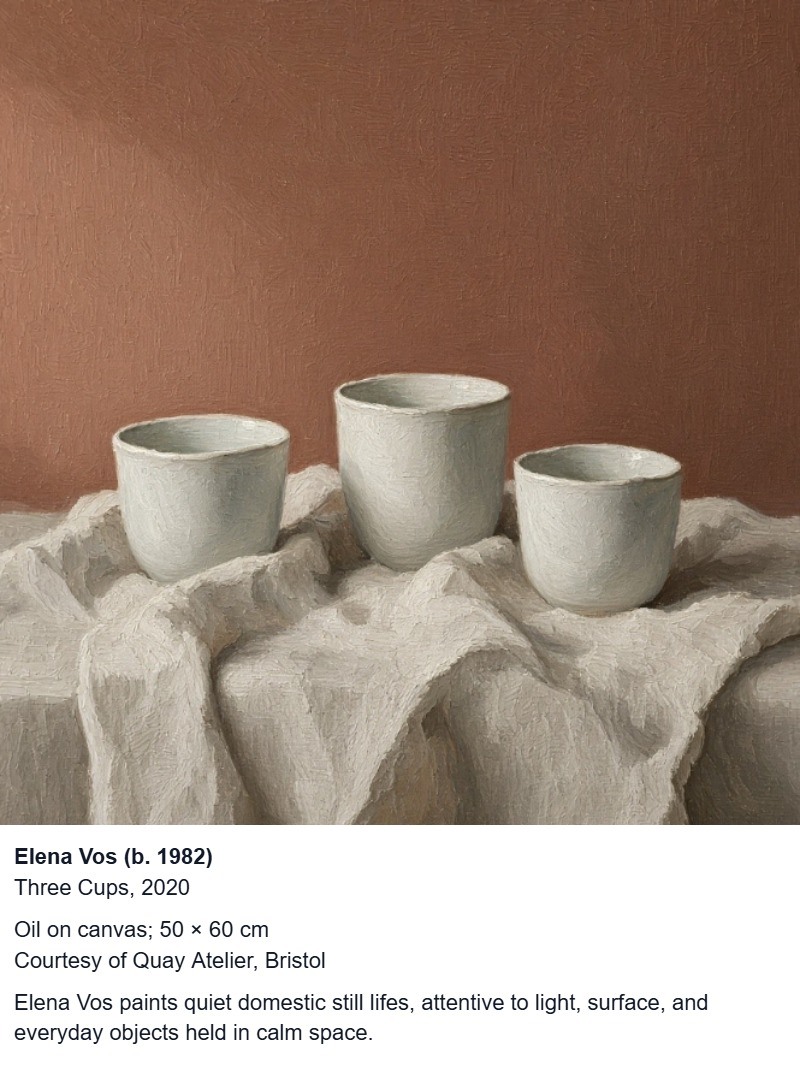
Exhibition wall / handout
Elena Vos (b. 1982)
Three Cups, 2020
Oil on canvas; 50 × 60 cm
Courtesy of Quay Atelier, Bristol

Another short example
Tomas Reed
Harbor Crane, 2018
Acrylic on panel; 45 × 60 cm

Another extended example
Hana Okada (b. 1994)
Paper Lantern, 2023
Oil on linen; 70 × 90 cm
Collection of the Meridian Trust
What you do not need
Skip the tools that slow install week or portfolio updates:
- Photoshop or Illustrator for a basic tombstone
- Rebuilding a Canva template for every work
- Uploading artwork to a third-party design account
- Hiring a designer for standard artist / title / year / medium lines
Tips for clean generated labels
Small habits keep generated labels looking intentional:
- Keep one master list of titles and dates so spelling never drifts
- Prefer specific mediums over “mixed media” when you know more
- Use the same unit system (cm or in) across a show
- Put the label on the image when files will be screenshotted or shared
Generate your free museum/exhibition label
Open ArtCaption, drop your artwork photo, paste your tombstone, and export a museum-style exhibition label under the image — no design skills required. Processing stays private in your browser, with no upload to our servers.
FAQ
- Is there a free museum label generator that does not need design skills?
- Yes. ArtCaption lets you add artist, title, year, and medium under an artwork photo in the browser and export a clean label — without Photoshop or template design.
- Can I use the same generator for exhibition wall labels and Instagram?
- Yes. Keep the same field order; use a shorter block for social and a slightly longer one for wall sheets or PDFs.
- Will a free exhibition label generator upload my artwork?
- ArtCaption processes images locally in your browser so your artwork stays private. You do not need to upload files to create a standard tombstone label.
- What text should a generated museum label include?
- At minimum: artist, title, year, and medium. Add dimensions and a courtesy or collection line when the label will leave your own archive.
Related guides
- How to Title a Painting: Clear Artwork Names for Galleries, Sales, and Online Captions
- How to Add a Caption Under an Artwork Photo (Without Photoshop)
- How to Write a Caption for a Painting (Artist, Title, Year, Medium)
- Artwork Caption Template: Copy-Paste Museum Labels for Paintings (Free Examples)
- Artwork Captions for Collectors: Catalog Your Collection Like a Museum
- Artwork Captions for Auction Houses: Consistent Credits from Catalog to Bid Room
- Exhibition Labels for Galleries: Consistent Captions Across Shows, Social, and Press
- Artwork Captions for Emerging Artists: Look Professional Before the Gallery Does
- Why Every Artwork Photo Needs a Caption Online
- How to Write an Exhibition Wall Label
- Museum Artwork Caption Examples (Painting, Photo, Sculpture)
- How to Write a Museum-Style Artwork Caption
Create your caption next
Upload an artwork image and generate a clean museum-style caption in seconds — privately on your device.
Add a Caption